


MS Word
Hi all,
I am using my office computer to finish my report. When I am about to run Microsoft Word, it cannot be loaded for an error appeared, pasted below the screen shot,

Microsoft Word
Microsoft Word can’t start Microsoft Word.
Microsoft Word cannot install the necessary files due to windows installer error 1450.
Insufficient system resources exist to complete the requested service.
OK

- 1012 views
- 3 answers
- 0 votes
Hi everyone,
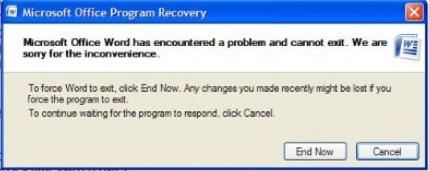
I am at home to finished my research work, after I pasted some pictures to my document and finished all the finishing touches, at last I am done. When I want to exit Microsoft Word, it will not close because of some error, I posted below the screen shot of the error.

- 2792 views
- 3 answers
- 0 votes
Hi techies,
Some of our office workers are using MAC machines for their work.
When one of the office worker is working on Microsoft Word for MAC, he encountered this error message that tells him" An unexpected error occurred while trying to load the Microsoft Framework library".

- 1353 views
- 2 answers
- 0 votes
Hello,
I'm having discomfort due to the mistake that is going to bother my official work poorly for two days.
On my office computer, when I try to save the file, I get the following error.

Microsoft Word
A file error has occurred.
Try one or more of the following:

- 2099 views
- 2 answers
- 20 votes
Hello,
I am using Microsoft Word 2007. Where before toolbars are visible at the top of my Microsoft Word 2007 Windows. As I used today, toolbars are gone! All I can see on the top are menus like Home, Insert, Page Layout, References, Mailings, Review and View. Then, when clicking the Menu instead of pull down menu, the toolbar showed.
I tried to check on the options, but I haven’t found settings to show my toolbar. What happened? I am only the one using this computer. I remember that I inserted my USB drive on it ,without scanning for viruses. Is it a virus?
Thank you all.

- 1969 views
- 2 answers
- 20 votes
Hi,
My personal computer at home is a Compaq made Presario series, and it comes with windows XP 32 bit operating system.
I have 1 GB of ram installed, and everything is working fine except MS word 2007.
Whenever I try to save any document in the Word, I received an error. After that error, the word closes down and restarts again. I can’t save any document in the word.
The file already available are easily opened by the word, and they cannot give me any error when I change them and then save them . Whenever I create a new file and tries to save it first time, the word after giving the same error, got closed automatically and then restarts.
The error is

- 3407 views
- 3 answers
- 20 votes
Hi all,
I currently have Microsoft Office 2003 installed on my desktop. I have been receiving emails with Microsoft Office 2007 attachments.
I know that I will not be able to view Microsoft Office 2007 documents with Microsoft Office 2003. I also know that there is a tool or an application that can be installed on your machine to allow you to be able to view and edit Microsoft Office 2007 documents even though you have Microsoft Office 2003.
I just do not know what the tool is called and where I can find it to download or purchase.
I would also like to know how to install .
Thanks!

- 1390 views
- 3 answers
- 21 votes
Hi folks,
I just bought a desktop computer that came with a Word Starter 2010. I've been using Word 2000 in my old computer.
Then I used the Equation Editor a lot. But with the new version of Word Starter, I've noticed that it doesn't support the equation editor.
Is there a way I can use the Equation Editor with Word 2010?

- 13609 views
- 7 answers
- 21 votes
Hi All,
How to make the Google for error screenshot images?
Regards and thanks in advance.

- 2339 views
- 3 answers
- 20 votes
I have a bunch of Microsoft Works(.wps) files that need to transfer as a .doc or .docx file. But I don’t know how to properly do this.
A site says I have to download wp6rtf.exe, but I found a trial version only.
This is a converter that enables Microsoft Word to view .wps files. I am using Microsoft Works 4.0 and I will be transferring the files into my Microsoft Word 2007. When I tried converting the file, it looks strange. It seems that the converting process is not successful.

- 2535 views
- 3 answers
- 20 votes
Latest Articles

The Tech Behind Fast-Cycle Bet Games And Why Timing Matters

How T-Mobile Postpaid Plans Improve 5G Connectivity And Mobile Value For Everyday Users

Skill-Based Slots Trend Or The Future Of The Industry
Latest Blogs

Top 10 New Laptop Entrants That Shook The Public

10 Facts About The Dark Web

Top 10 Latest Steam Cleaner Machines
Latest Tips

Top 10 Internet Monitoring Software

Top 10 Best Partition Manager Software
